Face culling
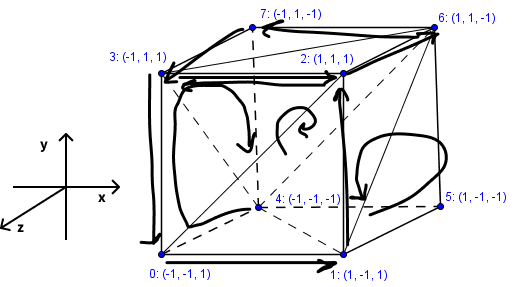
I was thinking to maybe draw the faces that are common (so if two cubes are next to each other, they have a common face, so it could only be drawn 1 time). I asked this on a forum and there was someone talking about face culling, a method where you only show the faces that are visible for the point of view of the user. This can increase speed rendering as 50% will be rendered.
It works with triangles and depending on their winding order, you make them (in)visible.
This article explains very well how it works: https://learnopengl.com/Advanced-OpenGL/Face-culling#:~:text=To%20enable%20face%20culling%20we,inner%20faces%20are%20indeed%20discarded
I tried do implement it in a cube. It is difficult to understand and add it, so I based on images I found on the internet about face culling.
Some numbers
| max_level | draw_rhombohedron() | generate_rhombohedron() | number of rhombohedrons | number of faces |
|---|---|---|---|---|
| 0 | 1 | 1 | 1 | 1 |
| 1 | 1 | 21 | 20 | 120 |
| 2 | 1 | 421 | 400 | 2400 |
| 3 | 1 | 8421 | 8000 | 48000 |
    draw_rhombohedron_counter = 0

    def draw_rhombohedron():
        global draw_rhombohedron_counter
        draw_rhombohedron_counter += 1

    print(f"Number of execution times for draw_rhombohedron(): {draw_rhombohedron_counter}")
    print(f"Number of execution times for generate_rhombohedron(): {generate_rhombohedron_counter}")
    print(f"Number of generated rhombohedrons: {len(precomputed_rhombohedrons)}")
    print(f"Number of generated faces: {len(faces_to_draw)}")
Refactor code (refactor-rhombohedron fractal.py)
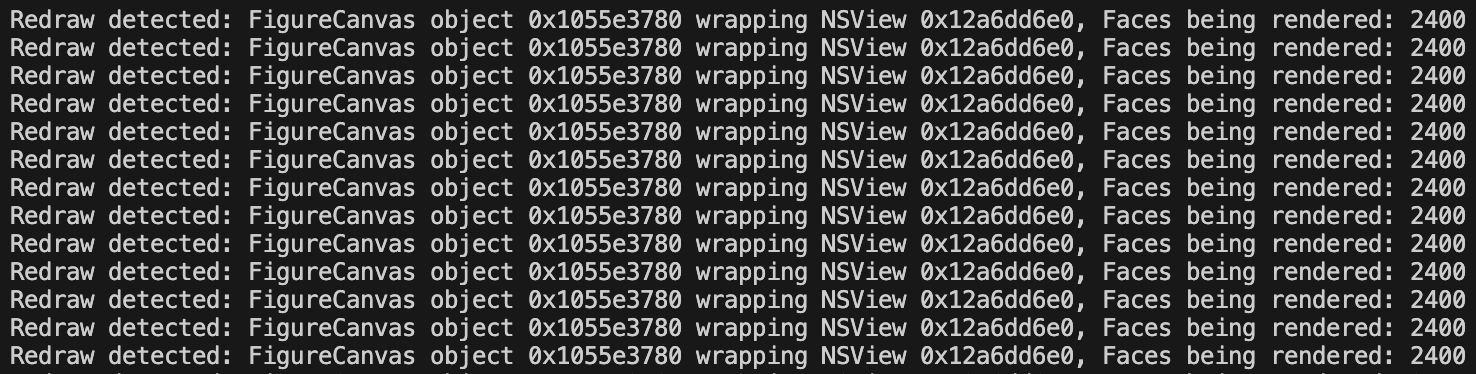
- Matplotlib redraws the scene with every rotation & zoom. When it re-renders, the amount of items being drawn stays the same.
    def on_draw(event):
        print(f"Redraw detected: {event.canvas}, Faces being rendered: {len(faces_to_draw)}")
    # Connect the draw event to our callback
    fig.canvas.mpl_connect('draw_event', on_draw)
Constants
- wrote constants in capital letters like the PEP8 guide tells us.
- changed some names for more clarity
- theta → angle
- origin_vertices → origin_vectors, because they are vectors from the origin
- moved background_color as a new constant
Other
- deleted ax.set_xlabel() → because we don’t need our labels.
- added short explanation of what the function does, as this is commonly used among Python developers
- using NumPy to make calculations easier
- ax.addCollection3d is now rendered one time, because it is outside the function
    faces_to_draw = []
    # inside function
    faces = vertices[FACE_INDICES]
    for face in faces:
        faces_to_draw.append(face)
    # outside function
    ax.add_collection3d(Poly3DCollection(faces_to_draw, facecolors='#FFF', edgecolors='#2A5D57', alpha=.8))
for rhombohedron in rhombohedrons:
        new_x, new_y, new_z, new_size = rhombohedron
        draw_rhombohedron(new_x, new_y, new_z, new_size)

 #shorter
  for new_x, new_y, new_z, new_size in rhombohedrons:
        draw_rhombohedron(new_x, new_y, new_z, new_size)
Interactivity in Blender
Already searched for interactivity in blender, but haven’t found anything yet, some loose stuff like how to add a material to an object, for example.
Why Blender Python Api?
- Useful to see real-time changes in a 3d environment, which uses a 3d engine.
- But harder if interaction takes place outside Blender such as a midi controller, then it is better for a standalone Python project.
Debug environment
Let’s make use of an alias, so it is easier to debug in Blender. How for macOs? (https://www.youtube.com/watch?v=RbQCzk-ef3g)
- Right-click on the blender application icon inside the folder
applications: Show Package Contents > Click on the folder contents > macOs > right-click on item: Make Alias. - Drag and drop the alias to desktop.
- Change logo if you want
We can now see “print()” inside this terminal!
Run code: click on arrow or Option + P (macOs)
How fast runs Python program?
To see how fast our Python project runs - we can run this code:
import time

start = time.time()
# wrap start & end around the code you want to check how fast it runs.
end = time.time()
print(end - start) # duration in seconds in terminal
I followed a tutorial (https://demando.io/blog/dev-generating-a-procedural-solar-system-with-blenders-python-api) to understand how materials are attached to objects.
    sun = create_sphere(5, 0, "Sun") # create sun as 3d primitive object, in a separate function
    sun.data.materials.append( # append() method to add material to sun
        create_emission_shader() # our material is here a function
    )
Random
To use random, import random module & use a method from it, like random() in the code below.
import random
random.random() # value between 0 and 1
- To generate a random color: https://www.youtube.com/watch?v=1Sw-1fZblBU
Custom operators
I also came across custom operators, but haven’t delved further into it. It looks like a UI panel where you can change values with buttons & sliders.