Inverse visibility
I want to have a checkbox to control what should be visible. I use a boolean property is_middle_revealed. If it is enabled, the middle shapes should be displayed. You then have the inverse of the fractal.
I have changed the name for this property several times to have a name that is clear.
First I called it is_middle_removed, but that name is confusing. You would expect that when it is disabled the middle pieces are shown, so you would see a solid shape with 6 faces with no further structure. So then I thought of is_middle_revealed, but that is also confusing. I also thought of inverse_fractal, where the ‘regular spongy hole shape’ is inverted. I think this is the most appropriate name.
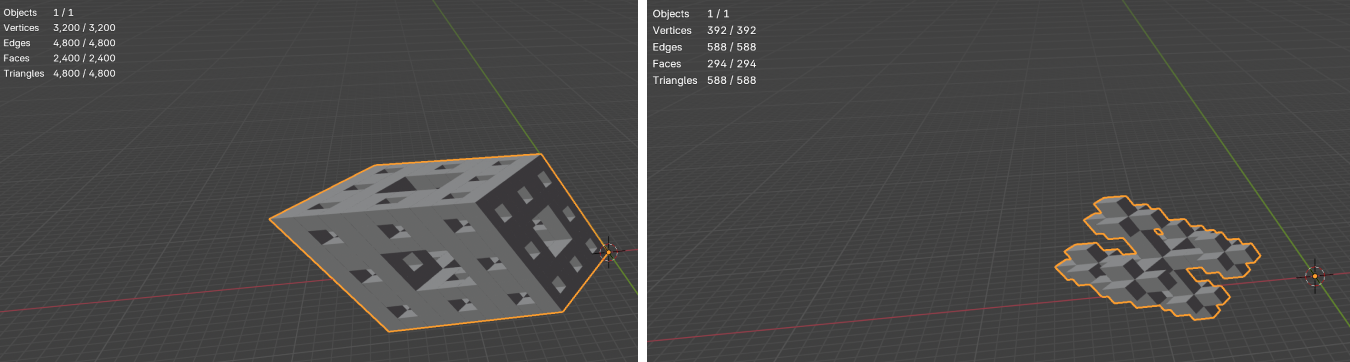
Step by step:
- Create custom property
inverse_fractal
# inside property group
inverse_fractal : bpy.props.BoolProperty(
  name = "Inverse fractal",
  description = "Determines which shapes should be visible. If enabled, the middle shapes are displayed and the other shapes not.",
  default = False
)
Use BoolProperty for True/False checkbox.
Set default to False, so you see the normal shape of the fractal first.
- Place it inside our custom panel
layout.prop(scene.fractal_properties, "inverse_fractal")
- Change the generate_rhombohedron() function based on this boolean property Run script and tick the checkbox. Inside INFO you see:
bpy.context.scene.fractal_properties.inverse_fractal = True
Let’s make use of that!
def generate_rhombohedron(x, y, z, rhombohedron_size, max_level):
  # ...
  if (bpy.context.scene.fractal_properties.inverse_fractal):
      for dimension_x in range(3):
          for dimension_y in range(3):
              for dimension_z in range(3):
                  if (dimension_x == 1 and dimension_y == 1) or (dimension_y == 1 and dimension_z == 1) or (dimension_x == 1 and dimension_z == 1):
                      continue

                  global theta
                  origin_vertices = define_origin_vertices(theta)

                  new_x = x + dimension_x * new_size * origin_vertices[0][0] + dimension_y * new_size * origin_vertices[1][0] + dimension_z * new_size * origin_vertices[2][0]
                  new_y = y + dimension_x * new_size * origin_vertices[0][1] + dimension_y * new_size * origin_vertices[1][1] + dimension_z * new_size * origin_vertices[2][1]
                  new_z = z + dimension_x * new_size * origin_vertices[0][2] + dimension_y * new_size * origin_vertices[1][2] + dimension_z * new_size * origin_vertices[2][2]

                  generate_rhombohedron(new_x, new_y, new_z, new_size, max_level - 1)
  else:
       for dimension_x in range(3):
          for dimension_y in range(3):
              for dimension_z in range(3):
                   if (dimension_x == 1 and dimension_y == 1) or (dimension_y == 1 and dimension_z == 1) or (dimension_x == 1 and dimension_z == 1):
                      global theta
                      origin_vertices = define_origin_vertices(theta)

                      new_x = x + dimension_x * new_size * origin_vertices[0][0] + dimension_y * new_size * origin_vertices[1][0] + dimension_z * new_size * origin_vertices[2][0]
                      new_y = y + dimension_x * new_size * origin_vertices[0][1] + dimension_y * new_size * origin_vertices[1][1] + dimension_z * new_size * origin_vertices[2][1]
                      new_z = z + dimension_x * new_size * origin_vertices[0][2] + dimension_y * new_size * origin_vertices[1][2] + dimension_z * new_size * origin_vertices[2][2]

                      generate_rhombohedron(new_x, new_y, new_z, new_size, max_level - 1)
Let’s optimise our code by refactoring.
- Place global theta & origin_vertices outside our if-else loop.
- Don’t write new_size every time again.
# before
new_x = x + dimension_x * new_size * origin_vertices[0][0] + dimension_y * new_size * origin_vertices[1][0] + dimension_z * new_size * origin_vertices[2][0]
# after
new_x = x + new_size * (dimension_x * origin_vertices[0][0] + dimension_y * origin_vertices[1][0] + dimension_z * origin_vertices[2][0])
- Create a separate function to calculate new_x, new_y, new_z -> our new coordinates
- Also place theta & origin_vertices in this function because we don’t use them anywhere else in our generate_rhombohedron() function.
def calculate_new_coordinates(x, y, z, dimension_x, dimension_y, dimension_z, new_size):
  global theta
  origin_vertices = define_origin_vertices(theta)

  new_x = x + new_size * (dimension_x * origin_vertices[0][0] + dimension_y * origin_vertices[1][0] + dimension_z * origin_vertices[2][0])
  new_y = y + new_size * (dimension_x * origin_vertices[0][1] + dimension_y * origin_vertices[1][1] + dimension_z * origin_vertices[2][1])
  new_z = z + new_size * (dimension_x * origin_vertices[0][2] + dimension_y * origin_vertices[1][2] + dimension_z * origin_vertices[2][2])
  return new_x, new_y, new_z
# inside dimension loop of the generate_rhombohedron() function, call function
new_x, new_y, new_z = calculate_new_coordinates(x, y, z, dimension_x, dimension_y, dimension_z, new_size)
- Get rid of the if-else loop. Write the dimension loop only once. Several ways tried to get it right. If inverse_fractal - only see middle rhombohedrons, if not inverse_fractal - then not see middle rhombohedrons.
One moment I had a tiny castle, this was not what I had to have…
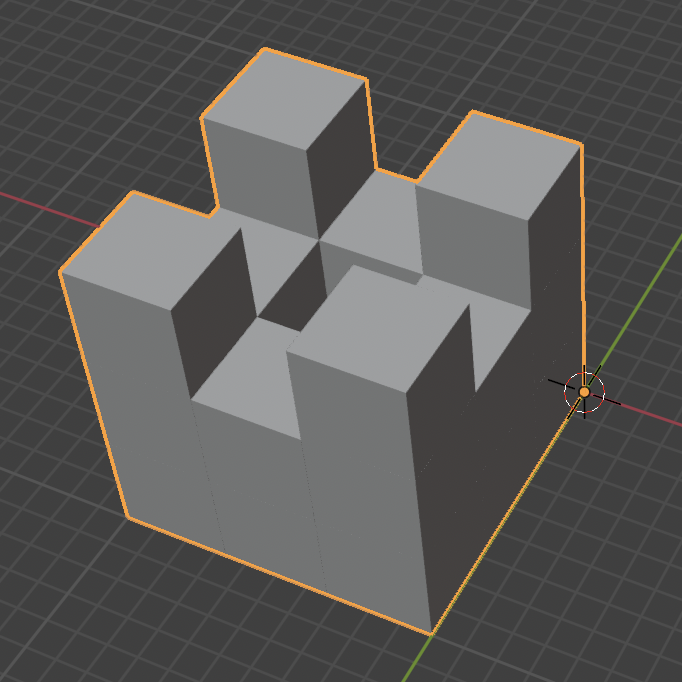
It was because of the use of the break statement. And then when the computer sees the break, the loop immediately stops and the computer proceeds with the next line outside the loop.
Tiny castle code:
# inside generate_rhombohedron() function
inverse_fractal = bpy.context.scene.fractal_properties.inverse_fractal

for dimension_x in range(3):
  for dimension_y in range(3):
    for dimension_z in range(3):
      if inverse_fractal and ((dimension_x == 1 and dimension_y == 1) or (dimension_y == 1 and dimension_z == 1) or (dimension_x == 1 and dimension_z == 1)):
        new_x, new_y, new_z = calculate_new_coordinates(x, y, z, dimension_x, dimension_y, dimension_z, new_size)
        generate_rhombohedron(new_x, new_y, new_z, new_size, max_level - 1)
        break

      elif not inverse_fractal and ((dimension_x == 1 and dimension_y == 1) or (dimension_y == 1 and dimension_z == 1) or (dimension_x == 1 and dimension_z == 1)):
        continue

      new_x, new_y, new_z = calculate_new_coordinates(x, y, z, dimension_x, dimension_y, dimension_z, new_size)
      generate_rhombohedron(new_x, new_y, new_z, new_size, max_level - 1)
elif: combination of “else if” in python.
After a few attempts, I got it working using a double if loop. The if loop (see code below) tells us that we must skip (by using continue statement) the middle rhombohedrons of the fractal. The if loop underneath tells us to only show the middle rhombohedrons if the inverse_fractal checkbox is checked.
# ...
inverse_fractal = bpy.context.scene.fractal_properties.inverse_fractal

for dimension_x in range(3):
  for dimension_y in range(3):
    for dimension_z in range(3):
      if not inverse_fractal:
        if (dimension_x == 1 and dimension_y == 1) or (dimension_y == 1 and dimension_z == 1) or (dimension_x == 1 and dimension_z == 1):
          continue

        new_x, new_y, new_z = calculate_new_coordinates(x, y, z, dimension_x, dimension_y, dimension_z, new_size)
        generate_rhombohedron(new_x, new_y, new_z, new_size, max_level - 1)

      elif inverse_fractal and ((dimension_x == 1 and dimension_y == 1) or (dimension_y == 1 and dimension_z == 1) or (dimension_x == 1 and dimension_z == 1)):
        new_x, new_y, new_z = calculate_new_coordinates(x, y, z, dimension_x, dimension_y, dimension_z, new_size)
        generate_rhombohedron(new_x, new_y, new_z, new_size, max_level - 1)
But there is still some duplicate code…
- Store
(dimension_x == 1 and dimension_y == 1) or ...in a variable. I call itmiddle_shape_conditionbecause this is the condition whether the shape is a middle rhombohedron or not. - Get rid of the continue statement
inverse_fractal = bpy.context.scene.fractal_properties.inverse_fractal

for dimension_x in range(3):
  for dimension_y in range(3):
    for dimension_z in range(3):
      middle_shape_condition = (dimension_x == 1 and dimension_y == 1) or (dimension_y == 1 and dimension_z == 1) or (dimension_x == 1 and dimension_z == 1)
      if not inverse_fractal and not middle_shape_condition:
        new_x, new_y, new_z = calculate_new_coordinates(x, y, z, dimension_x, dimension_y, dimension_z, new_size)
        generate_rhombohedron(new_x, new_y, new_z, new_size, max_level - 1)

      elif inverse_fractal and middle_shape_condition:
        new_x, new_y, new_z = calculate_new_coordinates(x, y, z, dimension_x, dimension_y, dimension_z, new_size)
        generate_rhombohedron(new_x, new_y, new_z, new_size, max_level - 1)
The code to be executed from the two loops is the same.
- Write the if and elif loop in one loop
if (not inverse_fractal and not middle_shape_condition) or (inverse_fractal and middle_shape_condition):
  new_x, new_y, new_z = calculate_new_coordinates(x, y, z, dimension_x, dimension_y, dimension_z, new_size)
  generate_rhombohedron(new_x, new_y, new_z, new_size, max_level - 1)
We can write it even simpler.
 # before
 if (not inverse_fractal and not middle_shape_condition) or (inverse_fractal and middle_shape_condition):
 # after
 if inverse_fractal == middle_shape_condition:
We can write it that way because both the inverse fractal and middle_shape_condition are booleans. So they both return True or False. We know that when the inverse_fractal = true, we only show the one from the condition, that is, if it fulfils that condition. The condition is then = true.
But then it is very simple written and we are not going to understand this if we were to look back at it later. So I’ll take the one from a previous step.
- Update automatically
Now we always had to click the checkbox and then change the max_level to see the reverse. We want to simplify this process, by clicking on the checkbox and then automatically start changing our shape. We can do this by adding the update function update_fractal to our inverse_fractal property.
Size
If I changed the size of the rhombohedron and then changed the number of max_levels, the fractal did not keep the size I had set up.
  # update_fractal() function
  size = bpy.context.scene.fractal_properties.size
  generate_rhombohedron(0,0,0, size, self.max_level)
The problem is because I changed the scale and not the dimensions of the object itself.
def update_size(self, context):
  object = context.object
  object.dimensions = (self.size, self.size, self.size)
  # object.scale = (self.size, self.size, self.size)
Acute angle
To deform the fractal also when the angle changes, we place the update_fractal function in the update_angle function called when angle changes. We also put some limits on the angle, because at 0 there is nothing to see. I keep the angle to 90 degrees, because that way you can also see the menger sponge.
def update_angle(self, context):
    global theta
    theta = math.radians(self.acute_angle)

    update_fractal(self, context)
Frustrations MidiController add-on
I linked to the properties once more the midi controller. But I personally find that I find it a bit frustrating to do it with the MidiController add-on I found to start setting things up:
- if you create your own custom property where you specify a min and max, you have to keep resetting this property in the midi controller.
- sometimes my values jump even though I just gave them a correct name. Which means I have to reset something. Or they suddenly stop working.
- Also, I would rather use the pads if value = 0, then checkbox is unchecked and at value greater than 0, checkbox is checked… But the pads work with velocity values so you have to press hard and fast to reach the high value.
-> I’ll have a look in this add-on to see what happens and understand it better, maybe I’m using things wrong.
TouchDesigner
Being curious and yes, at coach moment it was said that I shouldn’t spend time on this, I looked up how to import a Blender file (.fbx export) into TouchDesigner & how you could use a midi controller to change the camera position in TouchDesigner, for example. I quickly found some videos and tried it out.
Used videos:
- midi controller in TouchDesigner: https://www.youtube.com/watch?v=mF_v7L-I75M
- importing 3d model FBX in TouchDesigner: https://www.youtube.com/watch?v=NJ9gBmenn28
Since it would take me time to figure out how to make the interactions I got in Blender work in TouchDesigner too, I will note the necessary steps to make it work in TouchDesigner, without effectively elaborating. So rather some rough lookup without going into detail. Because with an installation, you obviously can’t have Blender open.
I will delve into the MidiController add-on a bit more first, because if it starts acting annoying all the time, it will be difficult for me to use it and I will have to come up with a solution.
Conclusion of the day
I have added some more interactivity and made things work that otherwise did not, but have not yet summarised what I have done so far.