Sierpinski Triangle
Today I want to focus on the Sierpinski Triangle and try to recreate it in different software I have not yet worked with. But first some background.
Background info
Inventor: Wacław Sierpiński
Year: 1915, but early versions also found in Roman churches.
How is it made?
- Remove each time the middle triangle (by taking the midpoint of the sides of the triangles & connect it with a line segment, then delete the triangle you made) of the triangle, so that three new triangles are created. The number of triangles can be calculated using the formula: number of triangles = 3 to the power of the number of iterations.
Peculiarities: - Equilateral triangles
- It is related to Pascal’s triangle
- Chaos Game = a method of creating a fractal randomly (found by Barnsley in 1988), but the end result is not always a fractal. But as I did research, I found that the Sierpinski Triangle can be created using this method. The rules are simple: (1) you pick a random point inside a polygon. (2) Take a random vertex with one of the points of the polygon. And take the and take the centre of the line segment. (3) Now you start at that point & choose again a random point of the polygon. The goal is to remember where you are. Iterate further and the Sierpinski Triangle is shown.
- https://mathworld.wolfram.com/ChaosGame.html
- https://www.youtube.com/watch?v=T_CmYqolWsM&t=268s
- https://math.hws.edu/eck/js/chaos-game/chaos-game-info.html#:~:text=The Chaos Game is a,They can be rotated.
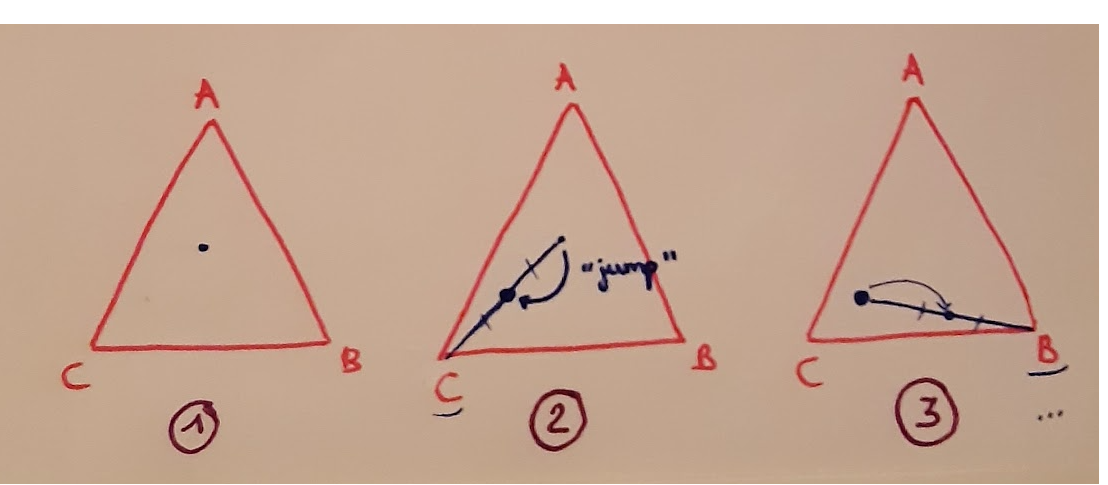
Instructions of the Chaos Game
Variations:
- Sierpinski carpet (there you remove the middle square by first divide the square into 9 equal squares)
- Apollonian gasket (circles)
- Sierpinski pedal triangle (no equilateral triangle)
- In 3d: Sierpinski Tetrahedron = Tetrix
- …
Fractal curve of the Sierpinski Triangle: Arrowhead curve
Sources
Barriger, G., & Fick, K. (n.d.). Sierpinski’s Triangle. https://www.methodist.edu/wp-content/uploads/2022/06/2022-Poster-G-Barriger-Triangle.pdf
Riddle, L. (n.d.). Sierpinski Gasket. Larryriddle.agnesscott.org. https://larryriddle.agnesscott.org/ifs/siertri/siertri.htm
Fractal Foundation Online Course - Chapter 1 - FRACTALS IN NATURE. (n.d.). Fractalfoundation.org. https://fractalfoundation.org/OFC/OFC-2-1.html
Sierpinski Triangle. (n.d.). Encyclopedia.pub. https://encyclopedia.pub/entry/32860
Processing
Since I have already used processing short in the first 2 days, this seemed like a good idea to test it out first.
I started from this tutorial (https://www.youtube.com/watch?v=7AvyvJnkdjE), which first drew a triangle in the middle, I thought it was quite bizarre how it was working, so I decided to look up some other tutorials on processing first, but there wasn’t really anything I liked, so I started myself.
We need a bit of maths before implementing in Processing.
1. Draw triangle in the centre of the canvas
To do this, we first need to know the coordinates of our triangle.
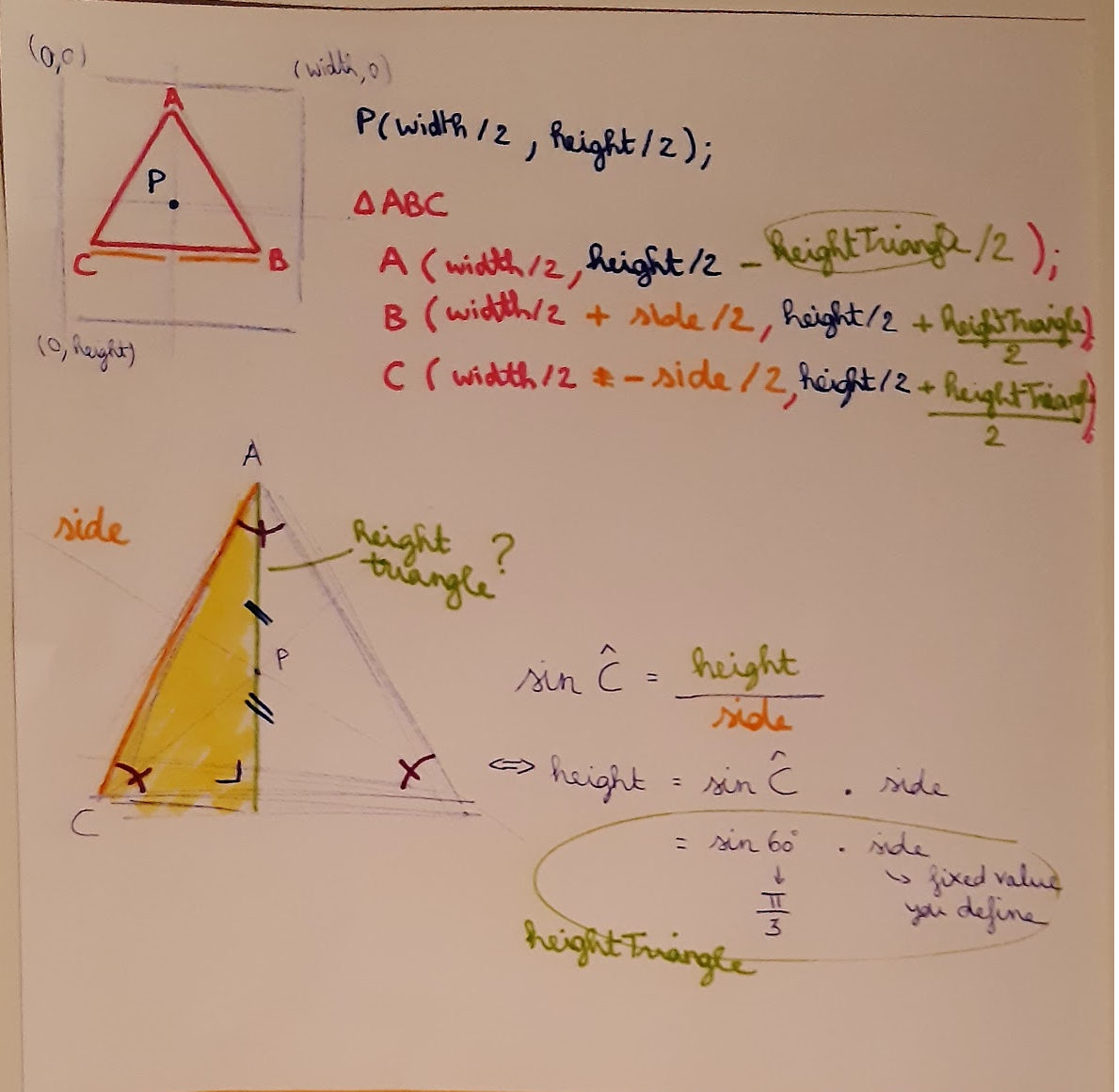
The y-coordinate is more difficult to calculate, but for this we can use the sine of an acute angle in a rectangular triangle.
We can draw the triangle using triangle() where we can include all the coordinates.
int side = 200;

triangle(
width/2, height/2 - (sin(PI/3)*side)/2,
width/2 + side/2, height/2 + (sin(PI/3)*side)/2,
width/2 - side/2, height/2 + (sin(PI/3)*side)/2
);
We have a lot of repetition here, so let’s start avoiding this. We can do this by first moving our triangle to (width/2, height/2).
float halfHeightTriangle = sin(PI/3) * side/2;

pushMatrix();
translate(x, y);
fill(0,0,255);
noStroke();
triangle(0, -heightTriangle, side/2, heightTriangle, -side/2, heightTriangle);
popMatrix();
I am using pushMatrix() and popMatrix() as seen in tutorial, this is going to ensure that we save the current transformation state and then return it to the original.
2. Multiple triangels
We create a new function removeTriangle() in which we keep track of the length of a triangle side & the current iteration. For this, I took the idea from this tutorial: https://www.youtube.com/watch?v=fwDkUxrFb0s, but he didn’t draw his triangle in the middle of the canvas, so I had to do my own calculations.
It is important to put a maximum in your function, otherwise the function will keep looping in infinity (as mentioned a few blog posts earlier). We do this by checking the maximum iterations.
We make the side half as small, as shown in the Sierpinski triangle.
int maxIterations = 3;

void removeTriangle(float x, float y, float side, int iteration) {
if ( iteration == maxIterations) {
drawTriangle(x, y, side);
} else {
//draw 3 new triangles inside the original triangle
float halfHeightTriangle = sin(PI/3) * side/2;
removeTriangle(x, y - halfHeightTriangle/2, side/2, iteration + 1);
removeTriangle(x + side/4, y + halfHeightTriangle/2, side/2, iteration + 1);
removeTriangle(x - side/4, y + halfHeightTriangle/2, side/2, iteration + 1);
}
}
To see the full code, go to my Github.
L-systems & trees
I’m fascinated by Fractal Trees, they look very realistic, so I had to discover this.
Background info
Inventor: Aristid Lindenmayer
Year: 1968
L-systems are also called Lindenmayer systems.
How is it made?
- It uses an alphabet by which sentences are formed. The sentences become longer by applying rules to them.
- There are 3 components that make up an L-system
- An alphabet: these are the characters that can be used to form sentences.
- An axiom: this is actually the starting point. You get a sentence or a character and apply the rules.
- Rules: there are rules to start replacing a letter with a sentence when you encounter one, for example
- You can start drawing an L-system with Turtle graphics 🐢 where you have to think of a turtle that you have different instructions on how it should move. An alphabet has been created, so ‘F’ means draw a line and move forward. Click on some examples here to see such weird code without programming: https://www.kevs3d.co.uk/dev/lsystems/. Turtle graphics as it were translates the output of an L-system and turns it into a drawing by starting to use different commands.
- With L-systems you can start making fractals like the Sierpinski triangle, koch snowflake cantor set…
- Found different sources, but I think Daniel Shiffman explains it very well: https://natureofcode.com/fractals/ (trees & L-systems).
Cool inspiration for 3d printing L-systems: https://coudre.studio/projects/printed-l-systems/
Tutorial
In the evening, I quickly tried out a short demo of Nature of Code, creating a basic fractal tree.
Sidenote about fractal dimensions
As I’m speaking of that I wanted to explore 3d fractals, as my topic, they are not really three-dimensional.
When I was reading about fractals in articles, I found fractal dimension & something with logarithms. But I didn’t understand it. But then I found this video: https://www.youtube.com/watch?v=uZvhWYRDK70 that explains how you can calculate the dimension of a fractal. It is not always what you would expect. For example, the Sierpinski triangle has a fractal dimension of 1.585 and the Sierpinski tetrahedron has a fractal dimension of 2.
This means that the Sierpinski tetrahedron is a fractal object that exists in 3D space, but its fractal dimension (= 2) means that it has properties closer to a 2D surface than to a fully 3D object.
It was Felix Hausdorff that discovered this (https://en.wikipedia.org/wiki/Hausdorff_dimension).
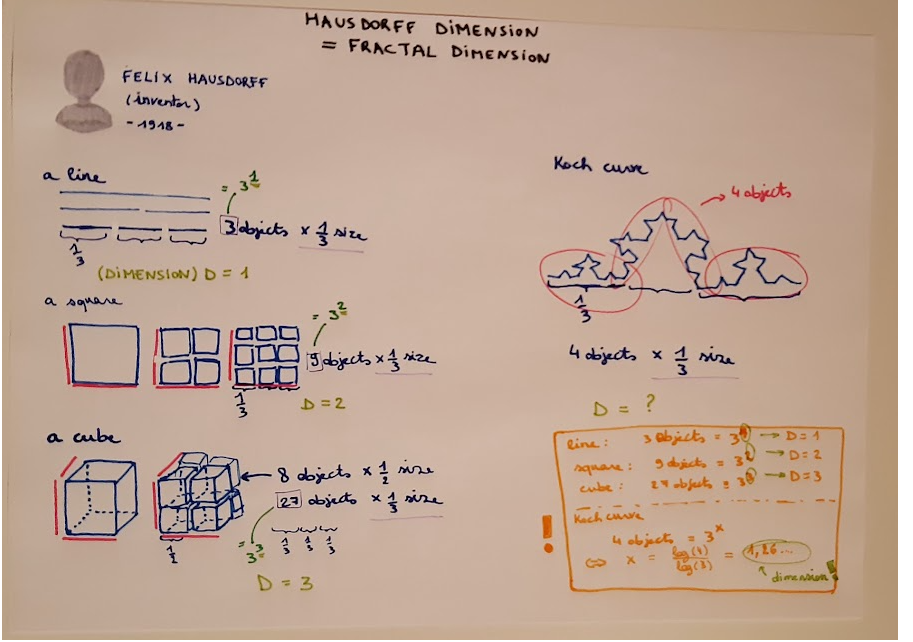
Formula: fractal dimension = log(number of self-similar objects)/log(scaling factor)