Something about the investigated fractals
L-systems, Newton & Burnship fractal
There are a lot of fractals, yesterday (13 January 2025), I went through the documentation of the L-systems on the Nature of Code website. I didn’t go into it any further, like the Newton fractal & Burnship fractal where I took half an hour for each to find out how they are created. I found it very complicated to understand mathematically and so I don’t go further into it here. The last fractal I looked at was the Julia set.
Julia set
Did you know that the Mandelbrot contains several sets of the Julia set?
Just type ‘julia set in mandelbrot’ into your search engine and you’ll see where the different Julia sets can be found in the Mandelbrot. This is no coincidence, as Benoit Mandelbrot came up with this fractal from studying Gaston Julia with his Julia sets. The Mandelbrot uses the same formula as the Julia set, but with the Julia set, c is a fixed complex number. A Julia set in the Mandelbrot is called connected Julia set, outside it (growing to infinity) it is called a disconnected or dust Julia set. The Julia sets have also been named like the Douady rabbit. And that’s not all: the iconic Mandelbrot can also be created by other equations. We call this the phenomenon of Universality of Mandelbrot. see: https://fractalfoundation.org/OFC/OFC-5-5.html
Making a choice
After taking a closer look at several fractals (Koch curve, Cantor set, Sierpinski Triangle, Mandelbrot & Julia set, fractal trees…), I now want to focus on 1 fractal per fractal experience.
Since I got the feedback to have a look in TouchDesigner (since it was not in my software list), I first looked for some inspiration on how fractals can take shape in TouchDesigner by looking up tutorials. In particular, I came across fractal trees that were being done a lot with and I think something fun might be made out of that. I think it would also be fun to look into audio-reactive projects in TouchDesigner to be able to make the fractal tree change based on sound like https://www.youtube.com/watch?v=bb4sKuAWYio.
I decide not to make anything for the Mandelbrot or a specific Julia set, because there is already a lot of information about that and after making the Mandelbulb using a Nature of Code tutorial, I didn’t feel like I can do many new things with it. I found particularly inspiring the article where White & Nylander were looking for a 3D formula of the Mandelbrot and showed different renders depending on power & iteration.
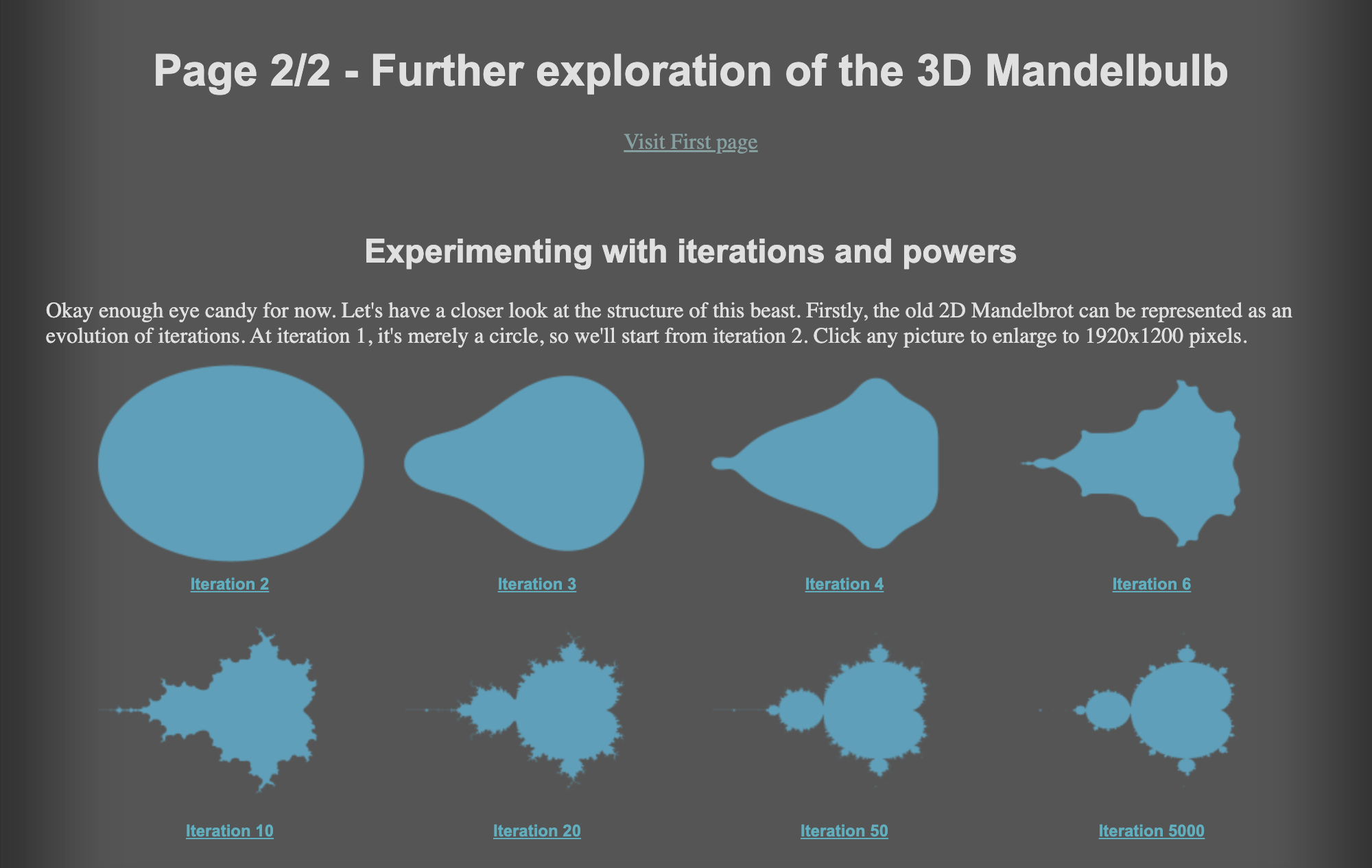
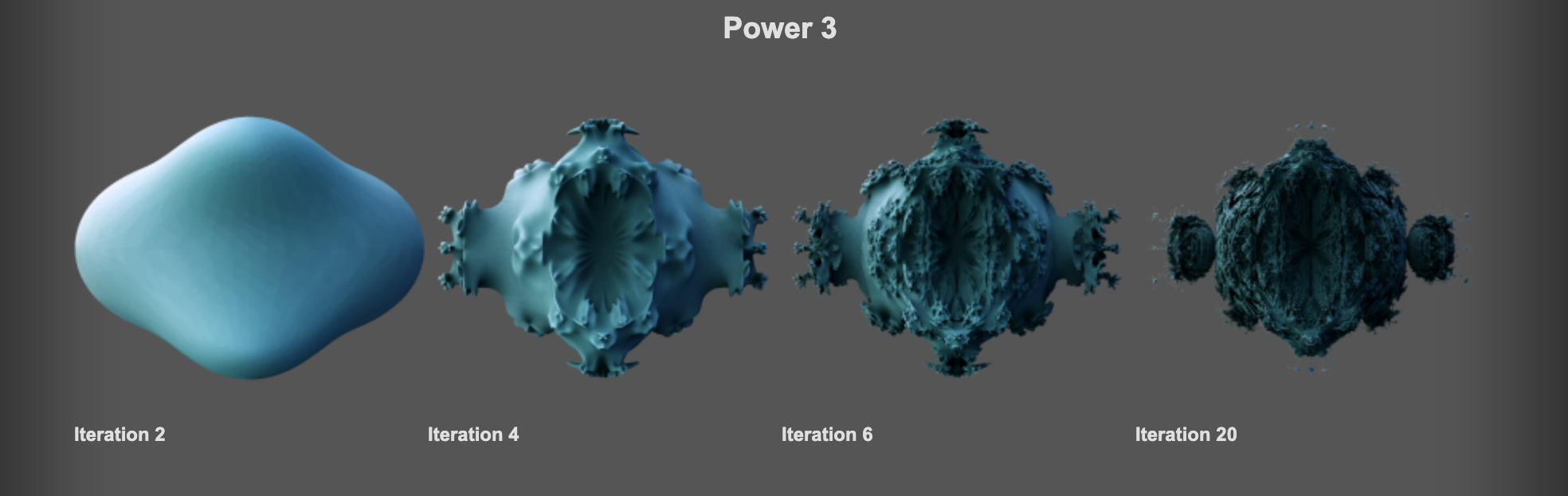
Choice made
I decided to delve further into Sierpinski fractals, i.e. fractal where a similar shape in the centre is removed again and again. But a lot has already been created around that type as well… I’m trying to let go of the idea that I want to make something innovative, because fractals drawn by computer have been around for a long time.
But for me it’s new, so I want to learn it. I don’t want to copy code, because otherwise I won’t learn anything either.
I was already looking at & programming the Sierpinski Triangle, and had found in my research that there are several variations (see blog post: Sierpinski, trees & fractal dimension). I looked at those variations to see if there was anything fun to do with them. Just following tutorial and writing code along, I didn’t want that. I really wanted to understand it.
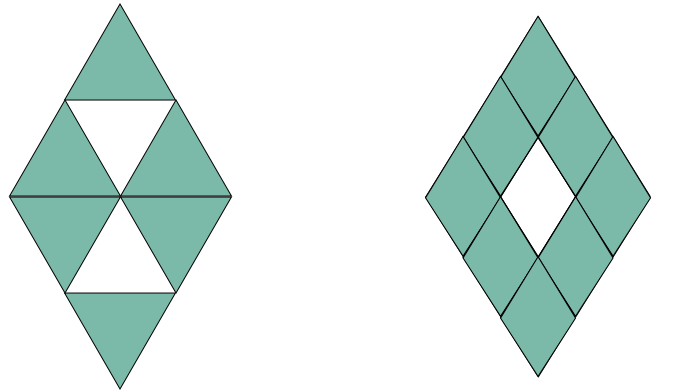
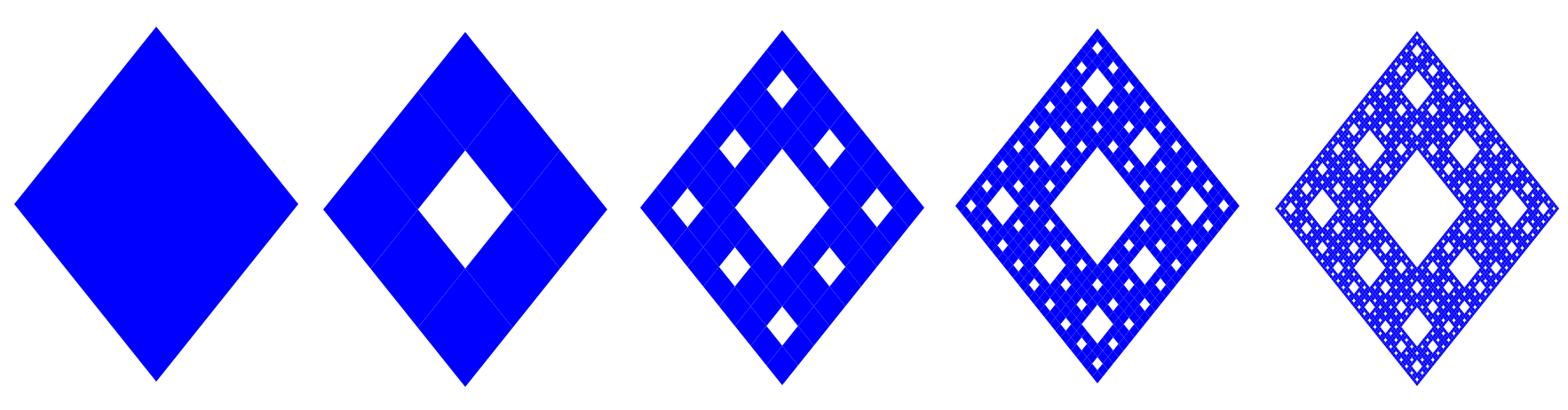
#Challenge 1 - Sierpinski Rhombus fractal: Program (first in Processing) a rhombus dividing it x-number of times into 9 equal rhombuses and remove the middle one. While doing so, make sketches so I can also explain to someone else exactly what is happening mathematically (e.g. why that number and not another?).
No examples of this fractal could be found online 🙂. So that was good. Even though I know it will look very similar to the Sierpinski Carpet.
Sierpinski Rhombus fractal
Explanation
We want our rhombus in the middle of the canvas -> use translate(width/2, height/2);.
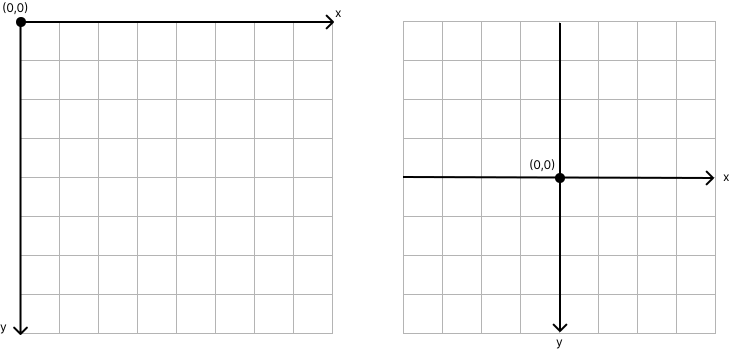
In Processing, you can use quad() for a four-sided polygon. We need to enter 4 coordinates for this. We can find this by using the large & small diagonal.
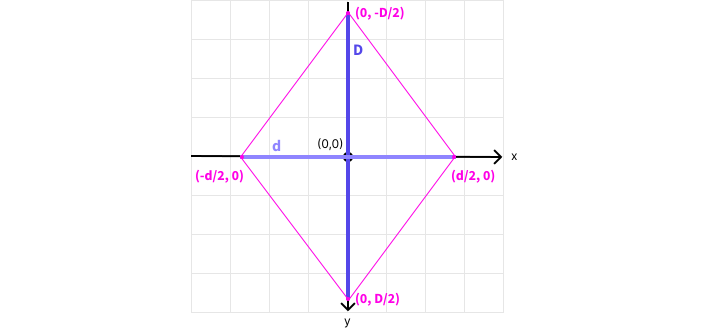
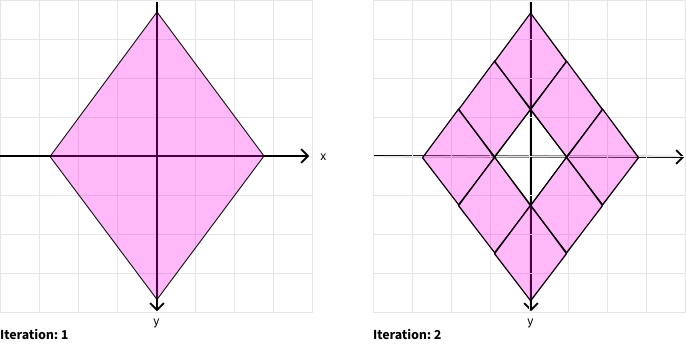
For the different iterations, we need to find the new coordinates. We do this by using our diagonals again.
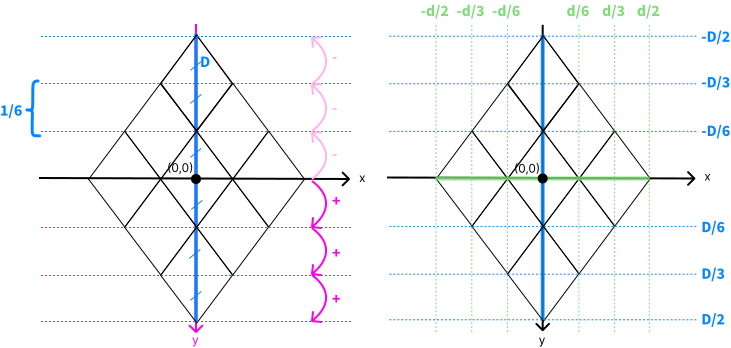
Right: you get the values indicated above & to the right.
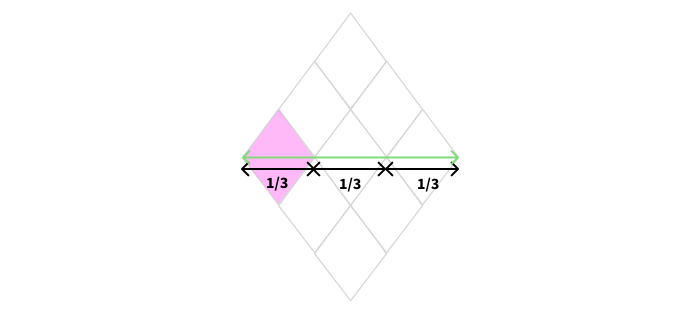
Let's draw the little rhombus at the top (coloured in figure) in two different ways: (1) with centre P(0,0) and (2)with centre P(0, -D/3) where there is a displacement first.
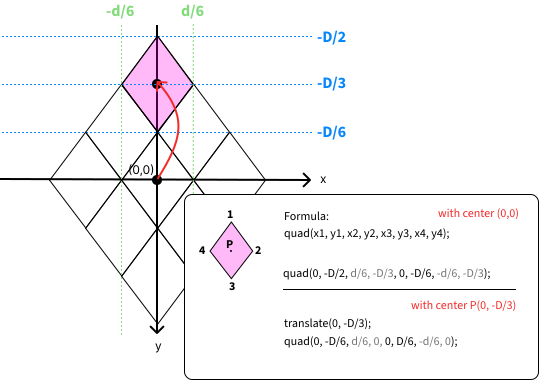
As we remove the middle rhombus each time, we move our centre from the original rhombus to the newly created rhombus (see above). This way, our calculations are not unnecessarily complicated.
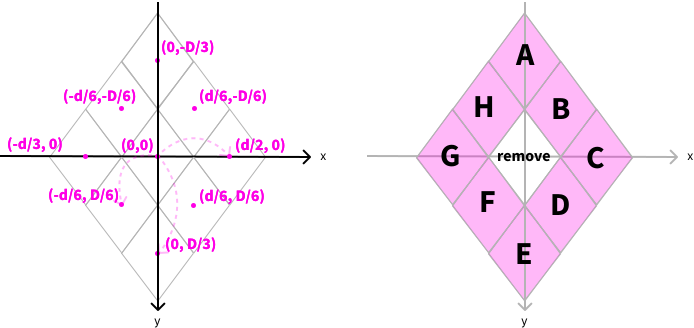
Right: letter system I use to draw the 8 different rhombuses.
To iterate over our rhombuses, I use this function:
drawRhombus(x + x coordinate middle point, y + coordinate middle point, newD, newd, iteration + 1);
For A this is: drawRhombus(x + 0, y + -D/3, newD, newd, iteration + 1); => drawRhombus(x, y - D/3, newD, newd, iteration + 1);
For F this is: drawRhombus(x - d/6, y + D/6, newD, newd, iteration + 1);
!!! Don’t change D or d into newD or newd, because we are looking at our previous iteration. We give both our newD and newd in the function, because those values change and aren’t equal.
To see the code, go to my Github.
Reflection
Now that I put the code of the Sierpinski2 demo next to this one, they are very similar. So I had used this one as a reference, but had almost not looked at it. The only difference is that Sierpinski2 used triangles and now it uses rhombuses.
In hindsight, it was actually not difficult at all. The hardest part is finding the coordinates of the centres of the rhombuses, but with the help of the two diagonals (I figured it out by myself!) it worked.
Reformulating goal
As I mentioned last week, I’m still a bit searching in terms of research question, end result… After my afternoon walk, I decided to let go of the idea of working with different senses. It hindered me from coming up with new ideas because the visual is interwoven into everything and focusing on one sense remains difficult.
By scanning tutorials from TouchDesigner, I got the idea of making small fractal experiences with 3D fractals: making separate things to show fractals in different ways. This way, I can understand how fractals work and use them as an inspirational medium. My focus remains clear as a result. Above all, I want to explore and understand the potential of 3D fractals, as this is all new to me.
Here I briefly note what has changed about the scope of the project, so that everything is clear.
Core project statement
For my personal passion project, I want to explore the world of 3d fractals because I am fascinated by these endlessly repeating patterns. I want to explore how different software platforms can transform the representation of 3D fractals into small-scale fractal experiences.
This project focuses on the potential of 3d fractals and demonstrates their versatility for STEAM enthusiasts. While it is fascinating to know that fractals have a connection to human well-being, this project highlights the creative and technical potential of fractals rather than their therapeutic applications.
Research question
How can we code a 3D fractal experience that provides (real-time) visual and auditory feedback tailored to the user’s interactions?
End result - deliverables
To be determined later: a technical report or a small fractal experience (simple version).
Further
Furthermore, I already did some research on how to print a 3d fractal just by programming (i.e. not ‘designing’, as in TinkerCad, Blender…). And defined a workflow for it based on the information I could find.
Next big steps:
- Coding 3d fractal & 3d print it
- Sources I’ve saved take a closer look & understand around fractal trees in TouchDesigner & try to make it myself.
- Looking at other software where you can make 3d fractals that react in real time.