In this blog post, I share my steps on how to transform a 2d Sierpinski Rhombus fractal to 3d. First, I drew a cube and then a rhombus in Python. Next, I first create a menger sponge and then I apply the same technique for the rhombus.
Cube
Step 1: basic setup
Create new .py file (make sure Python is installed)
Check if Python is installed: open a terminal and type “python3 —version”.
Install & import libraries
Install with pip3 on macOs ($pip3 install…) → make sure pip3 is installed (or you’ll see ‘zsh command not found’)
Libraries I use:
matplotlib: to generate 3d plot with axes
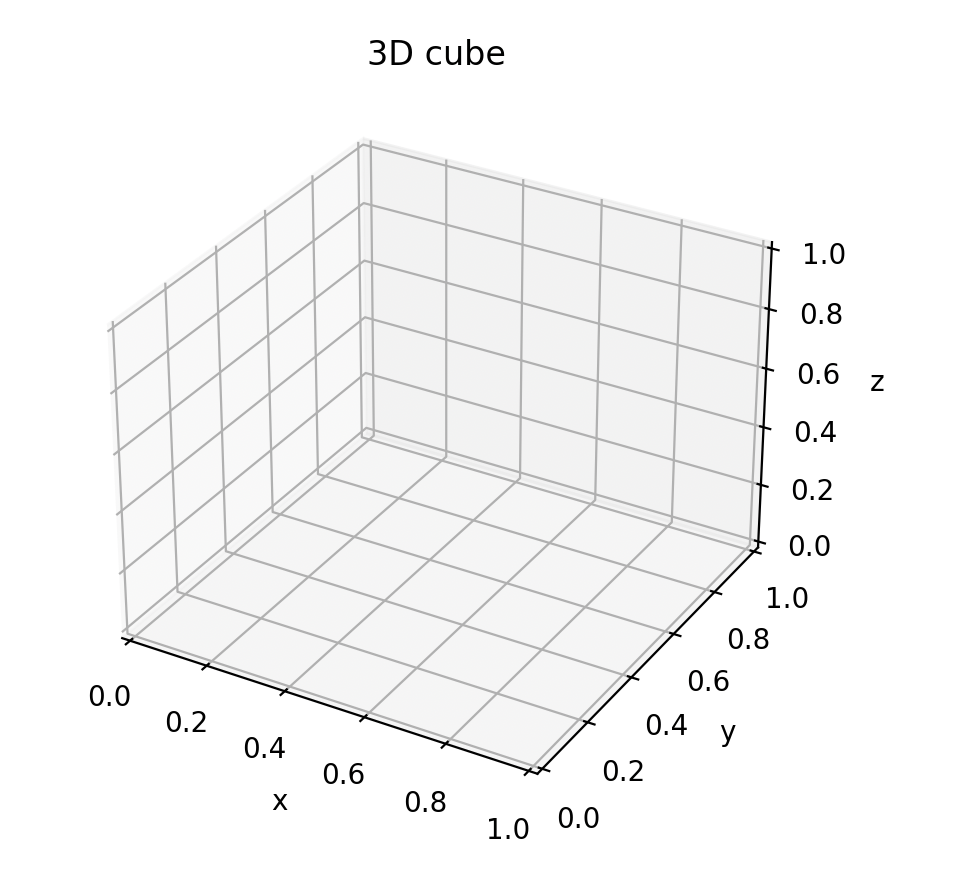
Create a plot figure
Place the various axes and label them.
Give your figure a name
plt.show() -> to show the plot
Later we can add some extras like background colour, remove the axes…
import matplotlib.pyplot as pltfig = plt.figure()ax = fig.add_subplot(projection='3d')ax.set_xlabel('x')ax.set_ylabel('y')ax.set_zlabel('z')plt.title('3D cube')plt.show()
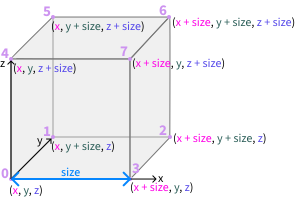
We want to make a cube. We can write down the different vertices and then connect them. But… we do want it to be possible at the end to make it a menger sponge by recursively removing the middle square at the six faces (+ in the middle). So we also need our side faces… In addition, we keep in mind that we want to give the vertices different coordinates for the rhombohedron.
Using add_collection3d & Poly3DCollection is something I saw when searching for how to draw a cube & polygons (the faces can be seen as polygons) in Python.
Step 3: add extras
Change background color
    ax.set_facecolor('Cyan') #bg color - inside plot
    fig.patch.set_facecolor('Cyan') #bg color - outside plot
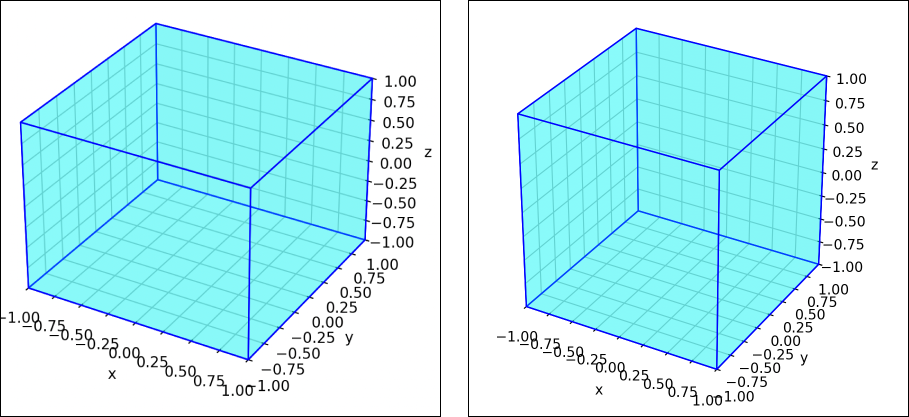
Left: without considering equal aspect ratio, right: with equal aspect ratio
It looks like we made a cuboid, instead of a cube. Yet the coordinates are correct. This is because the axes are not equally distributed. We can solve this by
ax.set_aspect('equal')
Remove toolbar & others
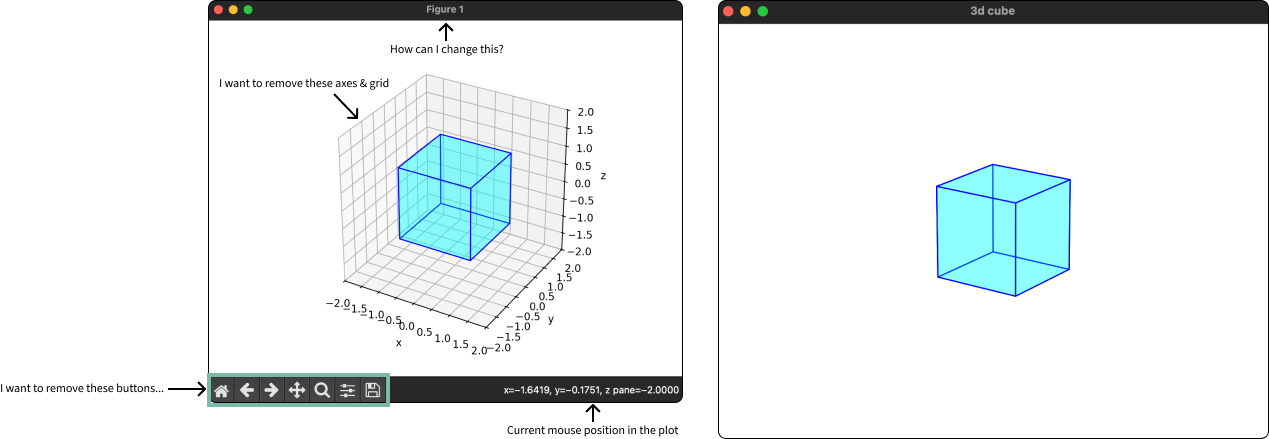
When creating a plot in matplotlib, a toolbar is automatically created. This is good for developer mode, but not as an end result.
On Stack Overflow I found several answers and tried those, but not all of them worked yet as some posts are older than 10 years(!). In the end, I succeeded!
Left: default UI, right: removed UI
    #version matplotlib: 3.10.0
    import matplotlib.pyplot as plt

    plt.rcParams['toolbar'] = 'None' #remove toolbar before create a figure

    fig = plt.figure() # create figure
    ax = fig.add_subplot(projection='3d') # setup plot for 3d

    fig.canvas.manager.set_window_title('3d cube') # change window title
    ax.set_axis_off() # delete axes
For the rhombohedron we do the same as the cube. We can start copying our cube code. We only need to adjust the coordinates of the vertices and possibly the faces if the vertices lie within another face.
Now, of course, the hardest part is calculating those coordinates mathematically. I was looking for examples where the rhombohedron is drawn with the coordinates of the vertices attached.
Method 1
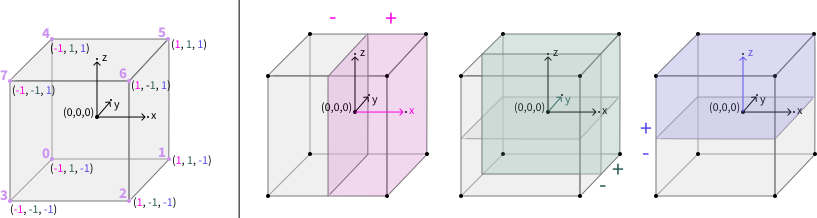
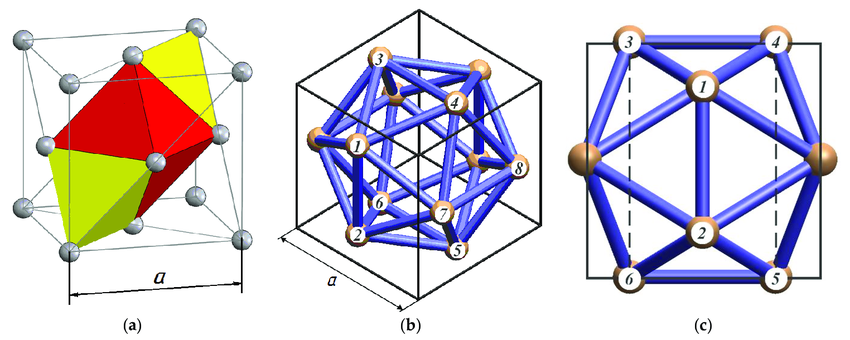
Based on the figure below, I can position the rhombohedron in the middle (x = 0, y = 0 and z = 0) using the same range as my cube, namely from -1 to 1.
Figure from: https://www.researchgate.net/figure/Cluster-representation-of-crystal-structures-a-rhombohedral-cluster-aggregate-of-the_fig1_374865644
We look at the leftmost figure.
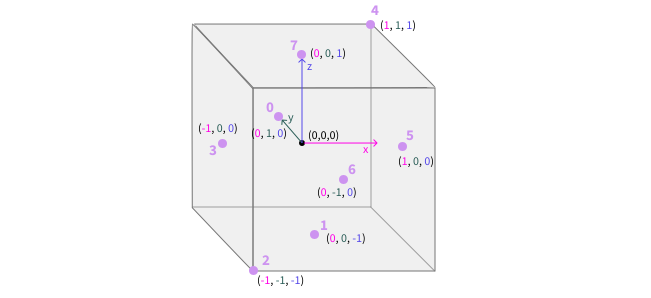
👀 Observation: note that the vertices are the centres of the faces of the cube in which the rhombohedron is trapped plus 2 more vertices of the cube itself.
It is now very easy to calculate its coordinates, because we take the centre of the range [-1, 1], or 0.
Vertices of a rhombohedron with index
When we add these values to our vertices array & change the faces array, we get this:
End result
Method 2
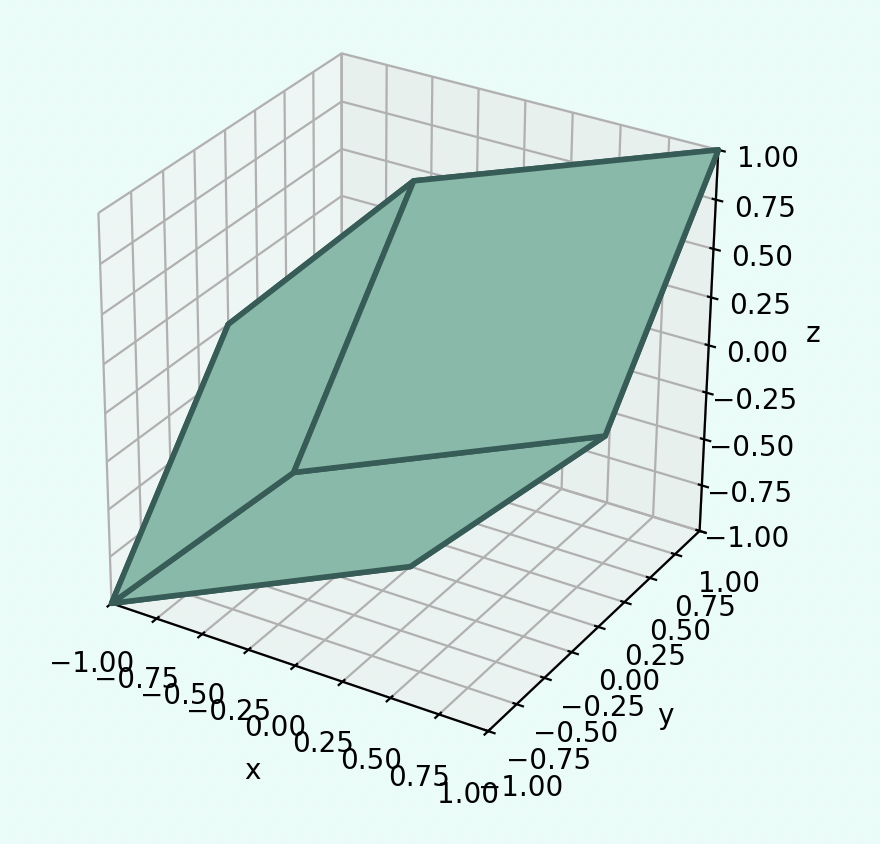
As you can see in the image above, the 3d shape floats. In method 2, we want it to lie flat, so we actually have 2 different z values that we use 4 times.
In this method there is more maths involved, because in the previous one we saw that the points are always the centre of the squares plus 2 more vertices of the cube containing the shape.
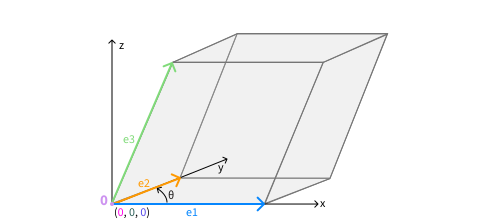
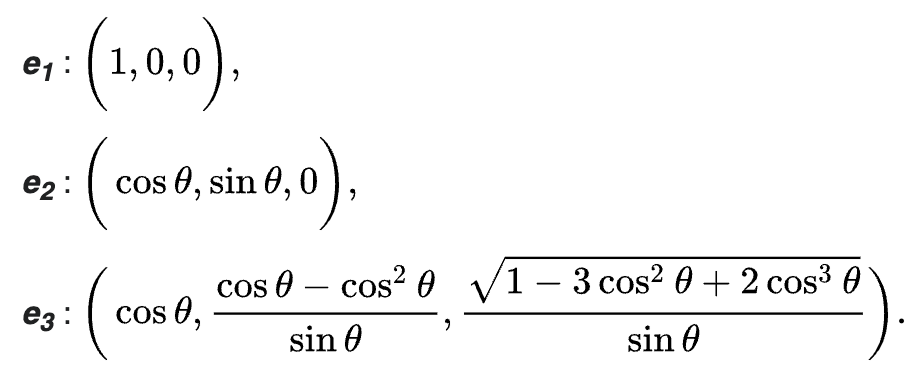
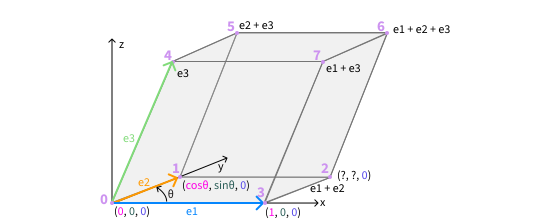
Calculations to determine the different coordinates of the vertices of a rhombohedron can be found on Wikipedia (https://en.wikipedia.org/wiki/Rhombohedron), where they give 1 vertex the coordinates (0,0,0), and from there run 3 vectors (e1, e2 & e3). That way, by adding vectors, we can calculate all the coordinates of the vertices. I did not make up the calculation e1, e2 & e3 myself, I take it from Wikipedia itself.
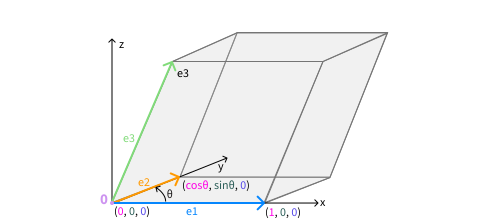
Let’s make it more visual.
Step 1: choose a vertex (0,0,0). From there, 3 vectors depart, we call them e1, e2 and e3.
The acute angle between e1 and e2, we call theta (θ).
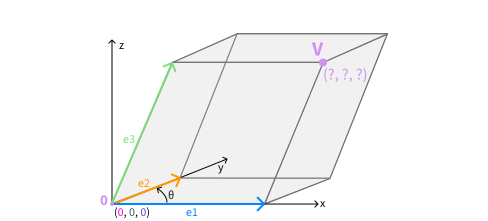
Step 3: Let's calculate the other vertices. What would V be?
As I said above, we can add vectors. Tip: e1, e2 & e3 are vectors. There are several possibilities.
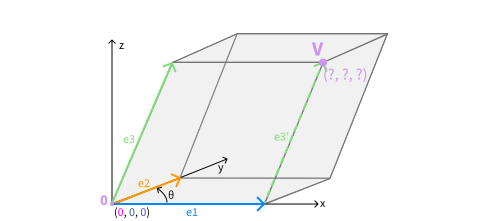
V = e1 + e3’
but... e3 = e3’
so V = e1 + e3
Calculate now the other coordinates with vectors.
Instead of calculating all the different coordinates manually, we let the computer do the maths for us.
Note: origin_vertices[0][0] means “take the first item from the origin_vertices array and take the first element of that array (inside origin_vertices).”
For e1 + e2 we add the x,y & z coordinates from the origin_vertices[0] and origin_vertices[1] up.
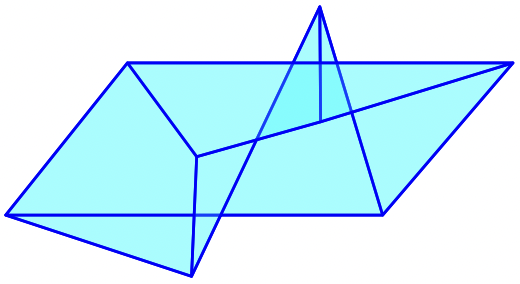
When I first started rendering the shape, I saw this (see below). I knew I was almost there, but that my faces were not quite right yet.
To solve it, you can change the vertices inside the arrays of the faces array or change the order of the vertices array.
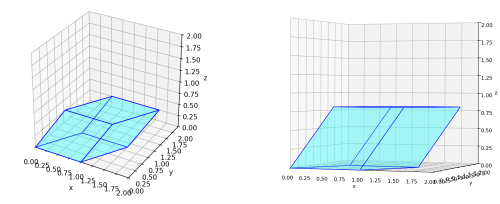
And there is our rhombohedron!
Left: it seems a bit odd from this point to see whether the rhombohedron is really flat or not.
Right: different perspective; yes, it is flat on the ground!
Menger sponge
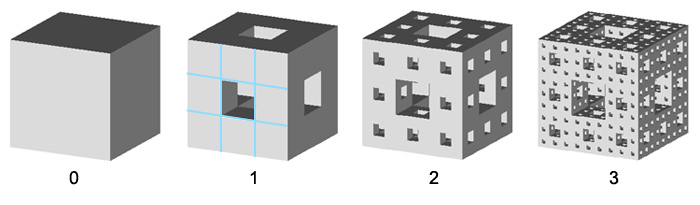
The menger sponge is the Sierpinski carpet in 3d.
I found this paper & will try to understand step by step what exactly is happening and will note this in more detail. When I didn’t know what it was, I searched for resources.
To create a Menger sponge fractal, we need to write a recursive function that removes the middle square.
Reuse logic from 2d
Let’s take a look at how we created the Sierpinski Triangle & Sierpinski Rhombus.
Little note: the Sierpinski Carpet I have not coded, but is same principle. I had created the Sierpinski Triangle & Sierpinski Rhombus in Processing, so syntax is different, but logic is similar.
We had 3 functions:
function that was responsible for setup.
function that hold the logic which shape should not be drawn (the middle shape)
In this function, it was important that we did not keep going infinitely, but that there is a limit to it.
And we kept going to the centre of our drawn shapes to then scale the shape by some factor.
function that draws all shapes that are allowed to be drawn
We had three inputs for our function that hold the logic, also called our recursive function:
coordinates middle point
size of shape -> cube will be 1/3 smaller -> we need to add the size to the new coordinates
current level / current iteration / current recursion -> however you call it; Instead of adding our iteration, we define how many levels there should be and then we go to zero by minus 1 each time. If the level is 0, we draw our shape.
Change coordinates
We can’t use coordinates like (-1, 0, 1), because we scale our cube, so the coordinates change depending on the size & there place in the grid. Therefore we write the coordinates like this:
Don't forget to make changes as well inside the faces array.
Which cubes should we remove?
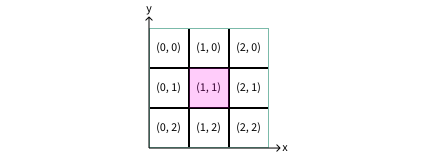
First, let’s look at this from a 2d perspective. We already know that we first need to divide our square into 9 equal squares and then remove the middle square. We can create an imaginary grid of 9 squares by looping over the range [0, 3[.
Creation of a grid of 9 squares when looping over the range [0, 3[.
In Python, we cannot work with a for(let x = 0; x < 2; x++){...}, (we could do it, but is cumbersome) so we do this with a range.
    for dimension_x in range(3):
            for dimension_y in range(3):
                    print(dimension_x, dimension_y)
When running our Python script, we see in our terminal:
First a new y-value is added for all x = 0, then for all x = 1 and then for all x = 2. First the left column is drawn from top to bottom, then the middle & then the last.
🧠 Insight: the first coordinate adjusts only when we have been to the deepest level.
Our middle square is then (1,1) -> So… if x = 1 & y = 1, we need to remove it.
But what in 3d? Let’s find out using the same method.
We saw in 2d that the first coordinate adjusts only when we have been to the deepest level. So we can already know that first for all x = 0 and y = 0 a new z-value will be added. We will find 1, 1, 1 in the middle. We can remove these if x = 1 & y = 1 & z = 1. But looking at images of a menger sponge, we need to remove more than that…
…also the middle square of each face. So a plus shape is actually removed in 3d.
We already know from 2d that two values are then equal to 1 (e.g. x = 1 & z = 1). Normally this should occur 6 times (since we have 6 faces).
The possibilities (for x, y, z with values between [0, 3[ )
x = 1, y = 1, z = 0
x = 1, y = 1, z = 1 → we exclude this one, because is our middle square of cube & we already have it
x = 1, y = 1, z = 2
x = 0, y = 1, z = 1
x = 2, y = 1, z = 1
x = 1, y = 0, z = 1
x = 1, y = 2, z = 1
So if at least 2 values are equal to 1, then the cube must be removed.
We use a for loop to check these values. The computer may not add a cube with two values equal to 1 to the plot, in any other case it does. We use ‘continue’ and not ‘break’ for this.
Difference between break & continue
A break statement will make sure when a condition is completed it stops executing the loop.
A continue statement will ensure when a condition is true, that it will not execute the lower code.
    for dimension_x in range(3):
            for dimension_y in range(3):
                for dimension_z in range(3):
                    if (dimension_x == 1 and dimension_y == 1) or (dimension_y == 1 and dimension_z == 1) or (dimension_x == 1 and dimension_z == 1):
                        continue
After continue we add a function to recall the function again with the new values.
We save all our cubes in an array, that we’ll use for display all the cubes by iterating over the array (for loop). To add those cubes, I refer to the code from the paper where they featured extend(). I found that you can also use append() to add something to an array. So I tried this. But this didn’t work because they are 2 different things. To illustrate this, I made a small demo.
With append() the array is added into the array, but with append() the brackets are deleted.
I also got other errors, like this one:
    cubes.append(generate_menger_sponge(x + dimension_x * new_size, y + dimension_y * new_size, z + dimension_z * new_size, new_size, current_iteration + 1))

    RecursionError: maximum recursion depth exceeded while calling a Python object

    [Previous line repeated 992 more times]

    -> solved by: + replaced by -, because we give the maximum number of iterations at the beginning. So we have to count down the number of iterations and not add up.
    -> I adapted the term current_iteration to current_level to clarify.
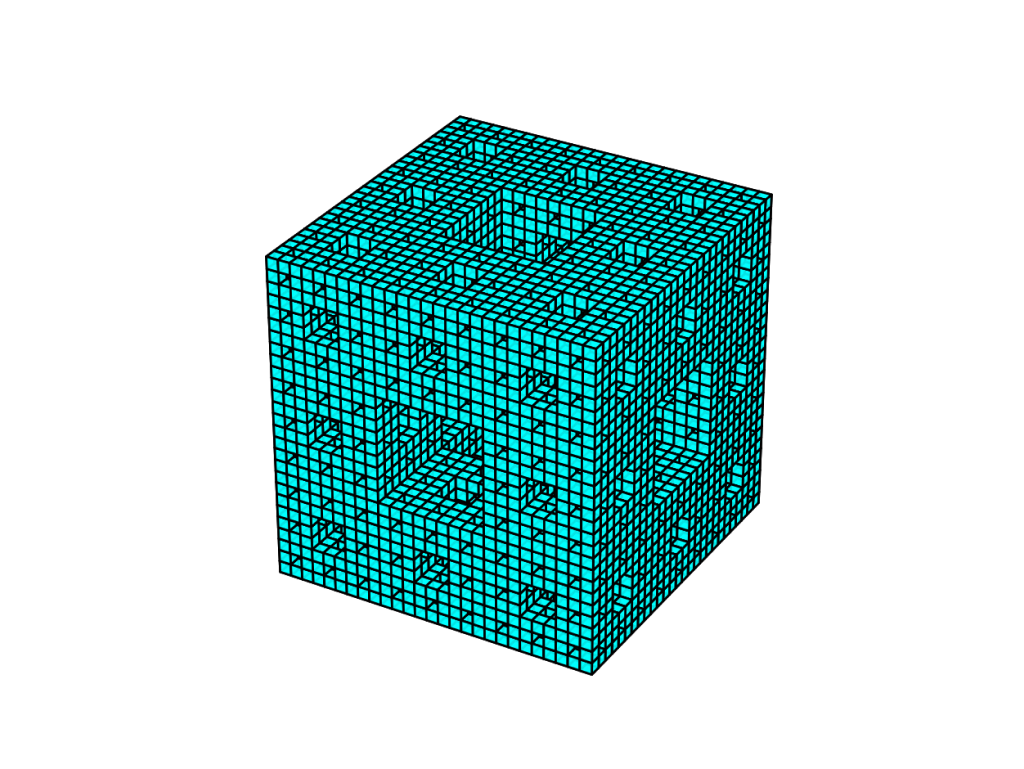
This recursive function for generating smaller and smaller cubes, we set up as 1 function and a second function to start drawing the cube with the same logic as described above for ‘cube’.